Working note
AI Model Guidelines
Opinionated guidelines for picking the right model for the task.
Copy HTML for SharePoint · Prices and model names from modelSpecs.ts
| Owners | Agentic Engineering Core Team |
|---|---|
| Refer to | Filip van Harreveld |
| Description | Opinionated guidelines for picking the right model for the task at hand. |
| Status | DRAFT |
The short version: do not always use the smartest model, and do not always use the cheapest one. Pick the model that matches the task.
A model that is too heavy wastes money. A model that is too light wastes time because you need more rounds, more corrections, and sometimes still get worse output.
Model Picker — At a Glance
| Simple | Medium — Low Creativity | Medium — Creative | Complex | |
|---|---|---|---|---|
| Best for | Clearly defined, low-risk tasks | Competent coding without heavy invention | Writing, UI ideas, refactoring, judgment-heavy work | Multi-file work, deep reasoning, architecture, hard debugging |
| Recommended model | GPT-6 Luna, Gemini 3.8 Flash, DeepSeek-V4.1-Flash | GPT-5.6 Terra, Composer 2.5 | Claude Sonnet 5.5 | GPT-6 Astra, GPT-6.1 Sol, Claude Fable 5.1, Claude Opus 5.5, Kimi K3 |
| Example tasks | Rename a prop, formatting, small bug fix, simple extraction, copy tweak | Straightforward coding where the outcome is already clear, modest refactors, article edits | Component structure, UX details, copy improvements, mid-size refactors, design exploration | Cross-file refactor with tests, architecture options, complex bugs, legal/financial analysis, brand voice |
| Reasoning effort¹ | Low | Medium | Medium | High → Max |
| Mode | Standard (avoid Fast by default) | Standard | Standard | Plan Mode with strong model, then switch to lighter model for implementation; Max Mode only when deep context is needed. If still not working, do the implementation with the heavy model too. |
| Approx. cost² | $ | $$ | $$ | $$$ |
| Avoid | GPT-6 Astra, Claude Fable 5.1, Claude Opus 5.5, Kimi K3, Max Mode, Fast Mode | Opus Fast, defaulting to Max Mode | Jumping straight to the heaviest model | Doing everything in Fable 5.1 or Sol + Max Mode by default — costs escalate quickly |
¹ Reasoning effort: Match to the real risk of the task. Don't overthink a simple prompt; don't underthink a task where a bad answer creates cleanup work.
² Cost: Approximate cost per task scales with model size, reasoning effort, and context window. Larger requests and provider surcharges raise cost. Cursor Max Mode applies to legacy request-based plans.
Model Pick
Think about two things first:
- Complexity: how much reasoning, codebase context, or multi-step work does this need?
- Creativity: do we want the model to invent, write, design, or explore options?
Recommended picks:
Complex tasks
Use GPT-6 Astra, GPT-6.1 Sol, Claude Fable 5.1, Claude Opus 5.5, Kimi K3. Use Plan Mode for complex multi-file tasks — see the Tips section below.
Medium tasks with creative work
Use Claude Sonnet 5.5. Usually a good balance for writing, UI ideas, refactoring, and judgment-heavy tasks.
Medium tasks with low creativity
Use GPT-5.6 Terra, Composer 2.5. Good when you need competence and context, but not the absolute heaviest model.
Simple, clearly defined tasks
Use GPT-6 Luna, Gemini 3.8 Flash, DeepSeek-V4.1-Flash. Avoid Fast mode by default. Fast is quicker, but more expensive, and often not worth it if you can do something else while the model works.
A practical creativity scale:
No creativity
Clear implementation, small bug fix, rename, formatting, simple extraction.
Low creativity
Straightforward coding where the desired outcome is already clear.
Medium creativity
Some judgment is needed: component structure, copy improvements, UX details, refactors.
High creativity
Writing, design, product ideas, architecture options, or exploring multiple solutions, open-ended strategy, major redesigns, brand voice, complex product decisions.
Reasoning Effort
Reasoning effort is how hard the model should think before answering.
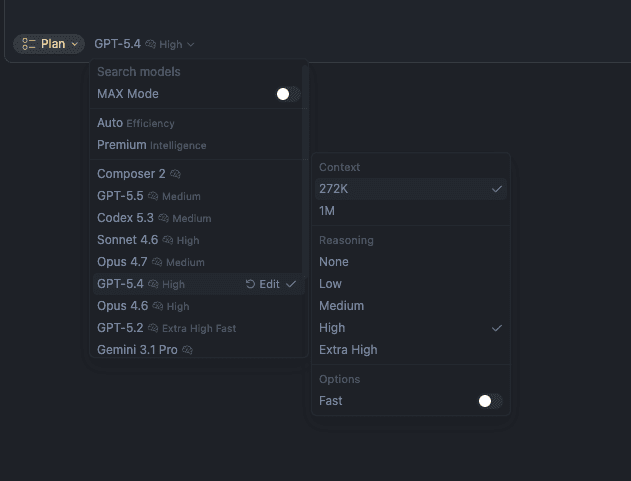
Low
Summaries, copy tweaks, simple Q&A, tiny code edits.
Medium
Normal coding tasks, modest refactors, article editing, UI improvements.
High
Multi-step debugging, architecture, tricky code changes, tests, data modeling.
Highest
Hard reasoning, complex bugs, legal/financial analysis, large cross-file changes, or anything where being wrong is expensive.
Rule of thumb: match reasoning effort to the real risk of the task. Do not overthink a simple prompt. But do not underthink a task where a bad answer creates cleanup work.
Productivity, Performance, and Cost Tips
Use Plan Mode
For complex tasks, start in Plan Mode with a stronger model. Let the model understand the problem, inspect the codebase, and decide the approach.
Then switch to a lighter model for implementation if the plan is clear.
Example:
Create a new component in our application.
Good approach:
- Plan with GPT-6 Astra, GPT-6.1 Sol, Claude Fable 5.1, Claude Opus 5.5, Kimi K3.
- Use medium or high reasoning depending on complexity.
- Implement with GPT-5.6 Terra, Claude Sonnet 5.5, Composer 2.5 if the work is straightforward.
This often gives better results than immediately throwing a cheap model at a vague task.
Max Mode
Use Max Mode with caution.
Do not be afraid of it. It is useful when the model needs a lot of context: large codebases, many files, long chats, big refactors, or deep debugging.
But do not use Max Mode for small tasks. It can cost much more because the model reads and reasons over more tokens.
Doing everything with Claude Fable 5.1 in Max Mode can get really expensive very quickly. Do not do this by default. Use it only when the task truly benefits from deep context and stronger reasoning.
Fast Mode
Avoid Fast mode by default.
It is convenient, but often more expensive. If the task is not urgent, standard mode is usually the better tradeoff. You can do other work while it runs.
Skills and Rules
Use skills and rules so the AI does not need to rediscover your whole workflow every time.
Good rules can tell the model:
- how your project is structured
- which patterns to follow
- which files are important
- how to test changes
- what not to touch
Also give context in the prompt. The better the context, the less the model has to guess.
Prompts
English prompts usually work a bit better than Dutch.
For simple tasks, be direct.
For complex tasks, explain:
- what you want
- why you want it
- what constraints matter
- what files or systems are relevant
- what good looks like
- ask the model to ask you questions if anything is unclear
That last point helps a lot. It prevents the model from guessing when the task has missing context.
Example Pricing
Provider API estimates per 1M text tokens. Full registry checked in October 2026; Mistral Large 4 checked separately on October 7, 2026:
| Model | Price per 1M tokens |
|---|---|
| Mistral Large 4 | $1.36 input / $4.18 output (standard); $0.68 input / $2.09 output (2026-10-06–2026-10-19 inclusive; 50% launch offer; calendar interpretation: Oct 6–19 inclusive) |
| Composer 2.5 | $0.5 input / $2.5 output |
| Composer 2.5 Fast | $3 input / $15 output |
| GPT-6 Luna | $0.1 input / $0.5 output |
| GPT-5.6 Terra | $2 input / $12 output |
| Gemini 3.8 Flash | $1.5 input / $7.5 output (standard); $0.75 input / $3.75 output (2026-09-02–2026-12-31 inclusive; Introductory pricing through December 31, 2026) |
| DeepSeek-V4.1-Flash | $0.3 input / $1.2 output |
| GPT-6 Astra | $10 input / $50 output |
| Gemini 3.1 Pro Preview | $2 input / $12 output |
| Claude Sonnet 5.5 | $2 input / $10 output |
| GPT-6.1 Sol | $2 input / $10 output |
| GLM-5.3 | $1.4 input / $4.4 output |
| Claude Fable 5.1 | $10 input / $50 output |
| Claude Opus 5.5 | $4 input / $20 output |
| Kimi K3 | $3 input / $15 output |
| Claude Opus 5.5 Fast | $8 input / $40 output |
Mistral Large 4 is a public-preview evaluation candidate, not an established production recommendation. Compare it on the same acceptance checks before switching. Its launch offer is interpreted as October 6–19 inclusive; standard rates resume October 20 in these estimates. Availability in Cursor must be checked separately.
Estimates include documented long-context surcharges. They exclude caching, tool fees, taxes, and platform-specific charges. DeepSeek uses peak rates; model access varies by platform.
Example 1: Simple Task
Task: Rename this prop and update the few places it is used.
Estimated usage: 20,000 input tokens, 2,000 output tokens.
Approximate cost:
- GPT-6 Astra: about $0.300
- DeepSeek-V4.1-Flash: about $0.0084
- Composer 2.5: about $0.015
- Gemini 3.8 Flash: about $0.022
- GPT-6 Luna: about $0.0030
- GPT-5.6 Terra: about $0.064
- GPT-6.1 Sol: about $0.060
- Claude Fable 5.1: about $0.300
- Claude Opus 5.5: about $0.120
- GLM-5.3: about $0.037
- Kimi K3: about $0.090
- Claude Opus 5.5 Fast: about $0.240
Advice: Do not use Astra, Fable, Opus, or Kimi K3 for this unless there is hidden complexity. GPT-6 Luna or Gemini 3.8 Flash is enough.
Example 2: Medium Creative Task
Task: Improve this article section and make the examples clearer.
Estimated usage: 80,000 input tokens, 8,000 output tokens.
Approximate cost:
- Composer 2.5: about $0.060
- Composer 2.5 Fast: about $0.360
- Gemini 3.1 Pro Preview: about $0.256
- Claude Sonnet 5.5: about $0.240
- GPT-6 Luna: about $0.012
- GPT-5.6 Terra: about $0.256
- GPT-6.1 Sol: about $0.240
- Claude Fable 5.1: about $1.20
- Claude Opus 5.5: about $0.480
- Kimi K3: about $0.360
Advice: Sonnet 5.5 is probably the best fit here. It keeps Sonnet 5's price without jumping straight to the most expensive models.
Example 3: Complex Codebase Task
Task: Plan and implement a cross-file refactor with tests.
Planning phase: 300,000 input tokens, 20,000 output tokens.
Implementation phase: 120,000 input tokens, 20,000 output tokens.
Better approach:
- Plan in Plan Mode with Claude Fable 5.1, Claude Opus 5.5, Kimi K3.
- Implement with GPT-5.6 Terra, Composer 2.5 if the plan is clear and the implementation is straightforward.
Approximate cost:
- Claude Fable 5.1 planning: about $4.00
- GPT-5.6 Terra implementation: about $0.480
- Total: about $4.48
Cheaper but riskier implementation option:
- Gemini 3.8 Flash implementation: about $0.165
- Total with Claude Fable 5.1 planning: about $4.17
Expensive version:
- Doing the whole task with Claude Fable 5.1 with the full context: about $6.20 or more
Advice: Use Fable, Opus 5.5, Kimi K3, or Sol where the reasoning matters most: understanding the problem, reading the codebase, and making the plan. Once the plan is clear, use Terra or Composer for implementation. Luna or Gemini Flash are useful when the implementation is mechanical and tightly specified.
The real cost is not just token price. If a model is too weak, you may spend five extra rounds fixing bad assumptions. That can be more expensive than choosing the right model once.